
If you’re still running ASP.NET MVC on .NET Framework, you’re on extended support only — no new features, security patches at best. Here’s a practical migration path based on real production upgrades, including the parts that actually cost time.
Why migrate
- End of active development — .NET Framework is feature-frozen. All new investment from Microsoft goes into .NET Core / .NET 8+.
- Performance — 2–3x throughput improvement on typical CRUD workloads is common, mostly from Kestrel and the rewritten middleware pipeline.
- Cross-platform hosting — deploy on Linux containers instead of Windows/IIS licensing, which cuts hosting cost meaningfully at scale.
- Built-in DI and better testability — no need for a bolted-on container; the framework assumes dependency injection from the start.
Framework vs. Core: what actually changes
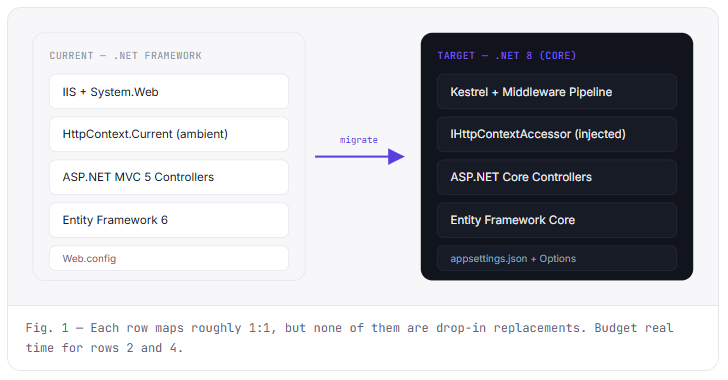
Before the step-by-step, it helps to see where the architecture actually diverges. This is the part people underestimate — it’s not a recompile, it’s a different pipeline.
Pre-migration assessment
Before touching code, audit these three areas. This is where most timeline estimates go wrong.
HttpContext.Current, in-process session state, and Web.config all need rework. There’s no direct 1:1 replacement — you’re re-architecting how request-scoped state flows through your app.Migration steps
-
1
Target framework migration
Convert your
.csprojto SDK-style format. Thetry-converttool handles simple projects; for anything with custom MSBuild targets, do it manually — the tool struggles there and you’ll spend longer debugging its output than doing it by hand. -
2
Replace System.Web
Swap
HttpContext.Currentfor injectedIHttpContextAccessor. Move Web.config settings intoappsettings.jsonwith the Options pattern (IOptions<T>).// Framework var userId = HttpContext.Current.Session["UserId"]; // Core — inject IHttpContextAccessor public MyService(IHttpContextAccessor accessor) => _accessor = accessor; var userId = _accessor.HttpContext?.Session.GetString("UserId"); -
3
Controllers & routing
Attribute routing carries over mostly unchanged. Watch for action filters that used
System.Web.Mvc.Filters— the namespace and base classes changed — and any reflection-based logic that assumed .NET Framework assembly loading behavior. -
4
Dependency injection
If you’re on Unity or Ninject, you can keep it via the ASP.NET Core DI adapter packages, or migrate to the built-in container. For most agency-scale projects, moving to built-in DI is less maintenance long-term — one less package to keep compatible with future .NET versions.
-
5
Entity Framework 6 → EF Core
Usually the highest-effort step. EF Core doesn’t support lazy loading by default (you opt in via proxies), some LINQ translations differ, and migrations have a different file structure. Complex navigation properties and multi-level includes are where this bites hardest — test query output, don’t assume parity.
Common pitfalls
Silent LINQ query changes. Some queries that worked in EF6 throw at runtime in EF Core — or worse, silently evaluate client-side instead of translating to SQL. Always check query logs after migration; don’t trust “it compiles.”
Globalization defaults differ between Framework and Core. If you support multiple locales, test date and number formatting explicitly — don’t assume the old behavior carries over.
Session state. If you relied on heavy in-process session, move to a distributed cache (Redis) during the migration, not after — retrofitting it later means touching the same code twice.
Testing strategy
Run the old and new versions side by side against the same database where possible. EF Core query translation differences won’t show up until runtime — a green build tells you nothing about query correctness. Log generated SQL in staging and diff it against the Framework version for your highest-traffic endpoints before cutting over.
Need help with your migration?
We’ve modernized legacy ASP.NET MVC systems to .NET Core for production applications — architecture through deployment. Let’s talk about your migration.